Showing posts with label Backup Data. Show all posts

Thursday, February 24, 2011

How to Link Your PC With Your Nokia Smartphones

How to Link your PC with your Nokia Smartphones, before synchronise all your valuable information, you need to let your nokia smartphone and your computer get to know each other. Connecting your nokia smartphone to PC is easy, and can be done in one of two ways: using either Bluetooth or a USB cable.
The latter is undoubtedly the fastest way of transferring large amounts of information, so we would recommended using a USB cable for downloading and exporting maps, music or photos.

Synchronising your nokia device manually is easy. Just select the “Sync all” option at the bottom of the screen next to the My Phone icon and all your data will be synchronised. You can also set your device and computer to sync automatically. Select options in the tools menu then device sync. Then simply tick what you want to be synchronized automatically, such as photos, music or contacts.

Backing Up and Restoring
Backing up your data is just as simple:
  • Connect your handset to your computer, select nokia ovi suit, then OK.
  • Opt for Tools > Backup in the nokia ovi suit, which will then compile a list of information on your phone that can be backed up.
  • Select what you want to back up. You can change the backup file destination by using browse to find an alternative location.
  • Click start to begin the backup. If you need to pause the process click “stop” and nokia ovi suit will come to a halt when it reaches a safe point.
  • Hit finish, and you are done.
Restoring your data should the worst happen is equally simple:
  • Follow step 1 as above.
  • Select Tools > Restore.
  • Using the pull-down backup menu, select the items you want to restore.
  • Hit start to kick off the restoration process. Again, hitting stop will stop the restoration process only when nokia ovi suit has reached a safe point to do so.
  • Click finish to exit.

Monday, January 31, 2011

How to BackUp Your Nokia Phone with PC Suit

Many features offered by Nokia PC suite, including back up. Nokia PC suite for your convenience can be connected wirelessly with infrared and bluetooth for your maximum comfort. Nokia PC-suite software can be installed in two ways, namely from the CD-ROM included in the sales package and downloaded on the Internet. Here are step by steps how to back up your Nokia smartphone using PC suit:

1. Download software Nokia PC suit here and install it your computer or netbook

2. Run the program, then connect your nokia cell phone with a data cable / bluetooth to a computer

3. Click the Backup icon, so the window appears as shown below:

4. Wait a few seconds until a window of data backup options like the following picture:

5. Select data you want back up and then press the right arrow button

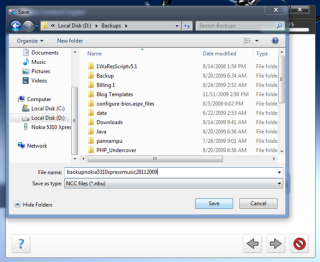
6. Select where the file will saved

7. After that, press the right arrow button again. Wait until the backup process 100%. 

Is easy to backup your nokia smarthones, isn't?