Showing posts with label Software. Show all posts

Wednesday, March 23, 2011

Download Nokia Software Updater for MAC (OS X)- My Personal Review

Download Nokia Software Updater for MAC (OS X)My Personal Review
Download Nokia Software Updater for MAC (OS X)- My Personal Review, Nokia Smartphones, Do you know Nokia Software Updater? Or usually named NSU? Okay now I will show you my personal review by using Nokia Sofware Updater on my nokia device. Nokia Software Updater (NSU) continues to be on laptop computer for a while, however because of nokia beta labs. the actual department associated with Nokia accountable for brand new as well as test applications. it’s right now available too with regard to Apple Mac (OS X). Come along following the reduce to discover in the event that Nokia Software Updater with regard to OS X is actually any kind of beneficial.

Nokia Software Updater may be the application you’ll end up being having to set up larger firmware improvements, as well as a few old applications. So far, NSU only has already been readily available for Computer Customers, however the later on edition through nokia beta labs facilitates Apple’s OS X.

Obtain Nokia Software Updater with regard to Macintosh through nokia beta lab, as well as do the installation just as you'd every other Apple application. As soon as it’s set up, you will find out for connecting your own Nokia phone by way of Universal serial bus.

Click Nokia Ovi Collection in your Nokia, therefore it understands for connecting for your Apple instead of simply getting. Nokia Software Updater may instantly look for products as soon as they’re connected, also it discovered the Nokia N8 within mere seconds.

As soon as it’s ready to go, the actual user interface could nott end up being simpler to get around and employ. You will immediately find out regardless of whether your own firmware can be day, regardless of whether you have to obtain brand new software program, and the way to achieve this if that's the case.

In my opinion Nokia Software Updater is really a helpful application, as well as we’re happy to determine this readily available for Apple OS X customers. You can download NSU free with no price here. Make your internet connection quickly because Nokia Software Updater has capacity 31 MB for downloaded.

Tuesday, March 22, 2011

Download Opera Mini 6 and Opera Mobile 11 for Nokia N8

Download Opera Mini 6 and Opera Mobile 11 for Nokia N8- Nokia Smartphones, nowadays Opera has launched Opera Mini 6 and Opera Mobile 11 for Nokia N8 or some other Symbian^3 device. Nevertheless missing the changelog of either versions, despite the fact that we observed a few quite useful innovations. Here are new Features of Opera Mini 6 and Opera Mobile:
Download Opera Mini 6 and Opera Mobile 11 for Nokia N8 and Symbian^3 device

  •     Line Set.
  •     Share option.
  •     Pinch to zoom.
  •     Support for HTML5.
You can download Opera Mini 6 and Opera Mobile 11 for Nokia N8 here.

Sunday, March 13, 2011

Nokia News: Top Ovi Store Downloads by Region


Nokia News: Top Ovi Store Downloads by Region- Nokia Smartphones, In facts Ovi Store is great services that provide new apps and games from a rising amount of companions and most 250.000 recent users registering to find Ovi Store day-to-day. In this article, I will show you top Ovi Store Downloads by Region. Here are examples of favorite and inventive new Symbian smartphone information in Ovi Store feature:
  • Swype: With one continuous finger or stylus motion across the virtual keyboard, Swype ’s products allows customers to enter words quicker and easier.
  • NHL GameCenter: Maintain your best hockey team by hearing live radio, looking at statistics and results or even by enjoying highlights and condensed games.
  • WhatsApp Messenger: This is a smartphone messaging app making use of 3G or WiFi  to get connected to close friends. Change from SMS to WhatsApp to deliver and get messages, photos, music notes, and also video messages free of charge.
Considering that Nokia started deliveries from the new Symbian smartphones, beginning with the Nokia N8 on 30 September, below are some popular app information:

  • The top downloaded free app globally was Q Torch, a software application app that turns your device perfectly into a flashlight, by CellApp Technology of India.
  • The top downloaded paid app was Angry Birds, the smash hit game, by Rovio Mobile of Finland
  • The third most favorite item downloaded worldwide was Need for Speed Shift HD, a game that provides the excitement of high-performance racing by EA Mobile of the U.S.
Okay here is a review the chart below for facts towards the most widely used regional apps and their developers. Next time I will review each the top Ovi Store downloads, apps and games.  

Saturday, March 12, 2011

Download New Update Nokia Reader for Nokia N8

Download New Update Nokia Reader for Nokia N8- Nokia Smartphones, I ever posted about download nokia reader RSS 1.0 beta one month ago,but now Nokia Reader, is updated to version 1.0.1 for our Nokia N8 or any other Symbian^3 device. With this updated to version 1.0.1, Nokia Reader is better, fixing some bugs of connectivity, but there is however still the issue in Symbian^3 version that at the time of start-up Reader application perhaps minimized to background. 
Note: Before installing Reader 1.0.1 beta you have to first install Ovi Notifications Support Package (ONSP) v1.1.11106.
Download New Update Nokia Reader for Nokia N8
Here are Changelogs new update nokia reader:
  • Correction for the troubles with Nokia account.
  • Upgrades for the connectivity problems familiar with Nokia Reader version 1.0b. 
Okay, you can download and installation New Update Nokia Reader for free on Nokia Beta Labs here. 


Tuesday, February 1, 2011

How to Upgrade Firmware on Nokia Phone - Step By Step Tutorial

Upgrades made to improve the ability of your cell phone. Although the same brand and type of phone, but if different firmware certainly is not the same mobile phone capabilities. Mobile phones with the most recent firmware performance will be better. If you find the phone is often an error, access is felt to slow down, application errors and so forth, immediately upgrade / update your cell phone when new firmware is available.

Upgrade to a particular type is also possible the addition of several features.  For users who want to upgrade cell phone vendors please visit the site. Considering the upgrades are now not only have to be done by authorized service center. Originally stay connected to the Internet, you can do it yourself. Here I use my Nokia N8. 

For Nokia phones, service upgrades consist of two versions:
1. First, upgrade directly on the phone (Over the Air), these services require a GPRS or Wifi. However, currently only the Nokia specific type that can be upgraded OTA.
2. Second is a service upgrades via a Personal Computer/Notebook/Laptop, by downloading the software updater and upgrade/ update process took place when the software is run. The upgrade process can only be done online.

Okay here step by step how to upgrade/update firmware by Over the Air (OTA)

Note before starting the upgrade steps, please:

  • Make sure the battery is fully charged 
  • Toll for the internet connection should be sufficient / via wifi 
  • Upgrade will erase all data phones. So, first back up your phone data. If you do not know how to back up your nokia smartphones you can read here.
  • Remove the password protect on the Memory Card (if installed) Menu > Tools > Memory > Remove Password 
  • Move / off the memory card (MicroSD) from Your Phone Menu > Tools > Settings > General > Security > Phone and SIM 
  • Set Pin code request: Off
  • Set autolock period: None
  • Return the lock / security code is the default: 12345
  • Remote Lock: No
  • Confirm SIM services: No
  • Uninstall antivirus installed
  • Uninstall software in use phone protection
The steps are:
1. If the latest firmware available, the phone will automatically download the installer. This file is small (about 1-30MB) and costs incurred depending on the service you use (preferably unlimited)
2. After successfully download, a box will appear. Install the firmware, press More> Install. This process will take about 5 to 15 minutes.
3.When the process dies (he he he) and after that the phone will restart with the latest firmware.
4. Next will come the confirmation that the upgrade is complete. But if you want to upgrade at a later time you can save the installer while in the phone memory.

Okay here step by step how to upgrade/update firmware via Personal Computer/Notebook/Laptop:
 
PC/Notebook/Laptop with minimum requirements :
  • Operating system Windows 2000 (SP4 or later) or Windows XP (SP1 or SP2) or Windows Vista
  • Memory 256 MB RAM
  • Processor Intel ® Pentium ® 4, 1.0 GHz or higher
  • Internet Connection
  • USB Port
  • USB data cable to a compatible phone
Read first: Upgrade will erase all data phones. So, first back up your phone data before doing the upgrade.
The steps are:
1. Download Nokia Software Updater in www.nokia.co.uk/A4226014
2. Select the type of phone that would be upgraded, if you do not find your nokia phone, it means your nokia phone can not be to upgrade.
3. This page you will download the Nokia Software Updater, you can find the exe file size 16 MB.
4. After a successful download, install and run the software on the PC.
5. Now connect phone with PC using data cable. Do not forget to connect the phone with a charger to avoid cell phone battery runs out during the upgrade process runs or battere must be FULL.
6. Press the 'Start'.
7. Select the profile 'General' and then press the 'Next'.
8. Nokia Software Updater will identify the phone and look for the latest updater available.
9. If your phone firmware is the latest then upgrade process will not run.
10. Conversely, if the latest firmware available, the Nokia Software Updater will start the upgrade process.
11. Wait until the confirmation that the upgrade is complete.

Finnish..You can choose upgrade firmware via Over The Air (OTA) or via PC. Is up to you, friends.

(NEW UPDATE) Firmware Update via Nokia Ovi Suite
Download the latest version of Nokia Ovi Suite Nokia Europe (note the system requirements)
Download Here
Start Ovi Suite> Tools> Software Updates.
It measures the same as the PC Suit (just follow the commands in the OVI suite)

Monday, January 31, 2011

How to BackUp Your Nokia Phone with PC Suit

Many features offered by Nokia PC suite, including back up. Nokia PC suite for your convenience can be connected wirelessly with infrared and bluetooth for your maximum comfort. Nokia PC-suite software can be installed in two ways, namely from the CD-ROM included in the sales package and downloaded on the Internet. Here are step by steps how to back up your Nokia smartphone using PC suit:

1. Download software Nokia PC suit here and install it your computer or netbook

2. Run the program, then connect your nokia cell phone with a data cable / bluetooth to a computer

3. Click the Backup icon, so the window appears as shown below:

4. Wait a few seconds until a window of data backup options like the following picture:

5. Select data you want back up and then press the right arrow button

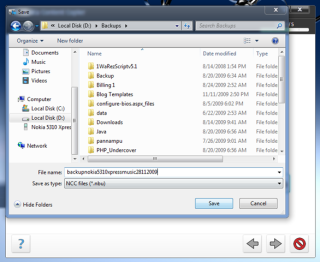
6. Select where the file will saved

7. After that, press the right arrow button again. Wait until the backup process 100%. 

Is easy to backup your nokia smarthones, isn't?

Wednesday, January 26, 2011

Nokia Reader RSS app 1.0 Beta for Symbian

Welcome to my blog again! Do you searching a simple and easy to use RSS reader to manage news feeds on your Symbian^3 or S60 5.0 device? Okay If yes, today Nokia’s Beta Labs team has announced the availability of Nokia Reader, an RSS reader application that brings news to your smartphone’s homescreen. The cool functions in this new Nokia Reader app include a home screen widget and push notifications. I’d  love to look support for Google Reader sync and so I didn’t  have to setup all my feeds in another application.

Nokia Reader is compatible with S60 5th Edition (excluding Nokia 5800 XpressMusic) and Symbian^3 devices.  According to info that I got in nokia site, nokia Reader has been tested to work with Nokia N97, Nokia N97 Mini, Nokia X6, Nokia N8 and Nokia C7. Here are main features include:
•    Uses push notifications
•    Content directory
•    Homescreen widget
•    Supports Nokia Account

Here’s a video of the app in action on an N8:


If you think Nokia Reader RSS app is useful, you can download it here. Any readers try this out yet?

Tags:  Beta Labs,Nokia News, Nseries, Software, Nseries software, Apps, nokia rss reade, symbian rss reader, nokia rss reader app, symbian rss reader app, nokia rss reader pdf download, nokia rss reader