Showing posts with label Symbian 3 OS. Show all posts

Monday, April 4, 2011

Symbian Twitter App: Different Tack, Free For Limited Time

Symbian Twitter App: Different Tack, Free For Limited Time
Symbian Twitter App: Different Tack, Free For Limited Time- Nokia Smartphones, Different Tack is a innovative fresh Twitter client that creates browsing your tweets less difficult and exciting! You will observe what’s hot with just a glance and browse through your tweets using a notch of your browse.

Different Tack can be purchased for free for a limited time. Have it currently and turn your information overflow into a data flow. Different Tack accesses your Twitter account. Your Operator may charge for mobile data transfer. You can download different tack app free at nokia ovi store.

Saturday, March 26, 2011

Nokia Shoot and Tag App Makes Bookmarks while shooting Videos

Nokia Shoot and Tag App Makes Bookmarks while shooting Videos for Symbian S60 v5 and Symbian^3
Nokia Shoot and Tag App Makes Bookmarks while shooting Videos for Symbian S60 v5 and Symbian^3- Nokia Smartphones, Nokia Shoot & Tag is a smart video application produced by Nokia Research Center, Beijing that instantly produces scene chapters in your video while recording. This revolutionary tagging technology was designed to supply a handy playback experience when watching videos.

Just press record and Nokia Shoot & Tag will instantly “tag” key scenes in your video, permitting an increasingly handy video playback experience. Rather than fast forwarding through your video for that ideal moment, the tags work as chapters that you could click on, which consider you straight to your preferred spot.

Here are features of Nokia Shoot and Tag:
  •    Click the red record button in the app to record, pause or resume while shooting.
  •     Auto and manual tag options.
  •     Inbuilt gallery to view the videos chapter wise.
  •     Just open the video within the app and click the frame to move to particular part while viewing.
  •     Adjust the video quality and toggle key frame auto-extraction on or off, inside the app settings.
  •     The original video in the phone’s galley remains unchanged.

You can watch Nokia Shoot & Tag video demo of the app from Nokia Beta Labs. Okay now you can download Nokia Shoot & Tag free for Symbian S60 v5 and Symbian^3 here.

Download Angry Birds Rio for Symbian^3 on April 8th

Download Free Angry Birds Rio Game for Symbian^3 on April 8th
Download Angry Birds Rio for Symbian^3 on April 8th- Nokia Smartphones, By now introduced for iOS and Android, Angry Birds Rio will probably be accessible to Symbian^3 devices download via the Ovi Store on April 8th.

The Angry Birds Rio game comes with feature only two episodes and sixty new levels with completely new successes and lots of techniques to get and is just not yet acknowledged with what price it will get through to Ovi Store.

In the mean time, when you wait, browse the new trailer of the movie Angry Birds Rio after the break.Okay so you can download angry birds rio game for your nokia two weeks again.

Thursday, March 24, 2011

Download Nokia N8 Debenhams App Review

Download Nokia N8 Debenhams App Review- Nokia Smartphones, we have observed a few wonderful applications for Symbian ^3 previously few weeks, with many different large companies queuing up to launch apps for products such as the Nokia N8. Debenhams is the newest, with its app to help you to purchase on the go, where ever you are. Come along following the break to discover when the Nokia N8 Debenhams app is worthwhile.

The home screen about the Debenhams app is vibrant, colourful and thoroughly clean. It features a simple to use menus, including the following choices: Shop All, Store Sale, Wish Checklist, Gift Finder, Keep in touch, Store Finder as well as Exit. You can also click on the bottom left part of the screen to determine any items that you’ve put into your shopping bag/order.

The store All section may be the part of the app you’ll end up being wanting to use when you initially go shopping. It takes you to definitely a sub-menu, letting you look for the types of item you would like, from Womens clothing, to Lingerie, in order to Mens’ and Kids’ clothes. You’ll additionally find Beauty, Presents and Toys, House and Furniture as well as Electricals.

Click on one of the over, and you’ll be able to look for the exact type of clothes you’re after, again having a huge choice available. Pick something you prefer, and you’ll be able to look at photographs of it, examine sizes, and supplment your shopping bag. You may also check for other items within the range.

Shop Purchase comes up with a comparable list of options, however this time with items which are on sale. Together with displaying the old cost, you’ll get to check out the purchase prices, and pictures of items. Click on all of them, and you’ll be able to look at more photographs or even add them to your own bag.

Once you’ve noticed the items you want, as well as added them to your own bag, it’s time to spend. You can click on the Check out option from your tote, but you’ll also have to sign-up before you can go any more. Once you have, you can easily invest in your items, and even have them delivered, all in the comfort of your couch using your Nokia N8.

The Keep in touch feature lets you type on a webpage with all of your particulars, so you can get updates associated with store offers and purchasers. The Store Finder web page simply lists the actual locations of Debenhams shops - it would happen to be nice to find Gps navigation functionality to determine the closest store, but it’s nevertheless easy to navigate as well as works well.

Whenever you want, you are able to click a Back again button to return to the prior page, and a House button to return to the start menu. All the buttons are large and easy to push, and navigating the actual app couldn’t be simpler. The only downside is deficiencies in a search function -- so you’ll have to choose products by kind, rather than being able to look for specific items.

General, the new Debenhams app is simple to use, and a good app. It’s a pity there’s no integrated research function (or all of us couldn’t believe it is if there is!), however it’s still easy to get around the store, with products clearly defined as well as split into different areas. If you’re into buying, Debenhams is an excellent option for your Nokia N8. You can download Debenhams App for your nokia N8 free here.

Tuesday, March 22, 2011

Download Opera Mini 6 and Opera Mobile 11 for Nokia N8

Download Opera Mini 6 and Opera Mobile 11 for Nokia N8- Nokia Smartphones, nowadays Opera has launched Opera Mini 6 and Opera Mobile 11 for Nokia N8 or some other Symbian^3 device. Nevertheless missing the changelog of either versions, despite the fact that we observed a few quite useful innovations. Here are new Features of Opera Mini 6 and Opera Mobile:
Download Opera Mini 6 and Opera Mobile 11 for Nokia N8 and Symbian^3 device

  •     Line Set.
  •     Share option.
  •     Pinch to zoom.
  •     Support for HTML5.
You can download Opera Mini 6 and Opera Mobile 11 for Nokia N8 here.

Monday, March 21, 2011

Speed X Game for Symbian^ 3

Download Speed X Game for Symbian^ 3
Download Speed X Game for Symbian^ 3- Nokia Smartphones, Speed X will be an action 3D tunnel game in which you must prevent colourful blocks by making use of tilt motion controls and get various difficulty levels.

Speed X game provides also support of red-cyan and green-magenta 3D glasses. You can download Speed X game for your symbian^ 3 from ovi store. You can download Speed X game for price 1 euro.

Sunday, March 20, 2011

How To Change The Font Size on Nokia C7

How To Change The Font Size on Nokia C7
How To Change The Font Size on Nokia C7- Nokia Smartphones, For those who have a problem with the actual font size in your Nokia C7, you will  be happy to listen to it is achievable to alter it. You could possibly desire to make text larger simply because you’re troubled to learn this, or interest to create this a bit smaller. Both of them are feasible due to the completely customisable Symbian ^3 operating system. Come along following the reduce to discover how you can change the font dimension onto your Nokia C7.

Altering the size of text in your Nokia C7 can easily massive difference to the consumer knowledge. Result in the text smaller, as well as every thing appears pin number sharp, with many different room. Ensure it is larger, as well as it’s in an easier way to see in case your ideas isn’t so great.

Step By Step To Change The Font Size on Nokia C7

Click Menu as well as Settings to begin with. After that Click on Phone as well as Display. It’s after that only a case of hitting Font Size, you are able to select from little, medium and large.

Should you don’t like the new typeface size, just click Typeface Size again, you’ll be able to change it directly back without needing to undergo any of the choices once again.

If you’re tied to other things Nokia C7 related, take a look at our preview Nokia C7 navigation. We will end up being providing you with extensive lessons for all you need to understand, from setting time to wireless diary synchronisation. If there’s anything particular you should understand, check out the manual and then leave the comment. Is there any problem to change the font Size on your Nokia C7?

Download Cake Mania- Main Street for Nokia N8

Download Cake Mania- Main Street for Nokia N8- Nokia Smartphones, Guide Jill and her best friends make plenty of money to revitalize Main Street in Cake Mania foor Main Street by handling and improving four unique downtown shops and building must-see places of interest, such as the World’s Biggest Cake, in this highly-anticipated sequel. You can download cake mania game for your nokia N8 here.

Thursday, March 17, 2011

Download Socially 3.05 for Nokia N8 or Symbian^3 Device

Download Socially 3.05 for Nokia N8 or Symbian^3 Device- Nokia Smartphones, Do you ever heard about socially app? Socially is usually a application for Facebook, Twitter, Linkedin and Foursquare. Socially at this moment launched version 3.0.5 Beta for the Nokia N8 or another Symbian^3 device, along with bug repairs and developments on Twitter, Foursquare and Facebook.
Download Socially 3.05 for Nokia N8 or Symbian^3 Device

For your information, Socially is a cell phone application that allows you to monitor lots of the friends you're linked to on several social networking sites. Feel free to use Socially to trace latest activity of friends on various social networking sites. In facts, Socially additionally demonstrates to you up-to-date social understanding of the callers throughout an incoming call and also as notifies on the mobile phone desktop (home) screen, making it possible to have greater interactions.

Here are Changelogs of Socially app for Nokia N8 or Symbian^3 device::
  • Facebook: Increased UI for looking at pictures and capability to comment and like pictures.
  • Twitter: Innovative tweets instantly displayed in Timeline, Mentions, Profile, Trends and Search results and not having to refresh your mobile phone screen.
  • Foursquare: Power to additionally publish your Shouts and Check-ins to Facebook and Twitter.
  • Desktop Alerts: Approximately twenty five alerts every five minutes and Power to turn-off the audio for alerts
  • Bug fixes: Fixed irregular problems relevant to Twitter Search and Trends for non-English languages
Okay, now you can download the new version 3.05 socially app for your Nokia N8 here.

How to Send Files Quickly from Nokia N8

How to Send Files Quickly from Nokia N8- Nokia Smartphones, Just about every single gadget includes a optimum file size support, the Nokia N8 for example, I never expert this sort of issue. Yet to generally be certain that any person certainly not results in this issue. WinRar for your Nokia N8 does the work. You can compress a file in your Nokia N8 previously sending it to any place. Songs data files might be big from time to time. You will find a further method that it's possible to quickly send data files to you pc. You can read how to link your PC to your Nokia  first.

As soon as the file is compressed, the data format is modified either to rar, .zip, .tar, .7z or .gzip. Your pc will be able to extract the entire file formats but my Nokia N8 is able to only extract .zip files. For those who aren’t considering following all of these ways, you certainly smartest choice would be to possibly copy or transfer the file to a USB or an external storage.

These two solutions are great but in the end of the day, I would like to have the file to my Computer so I could upload it, the quickest technique among these 2 is to copy the file to a USB or an external storage. To deliver a file to your Personal computer via e-mail could be busy that you need a WLAN connection or a data plan to move a file that huge.So its easy how to send files from the nokia N8, isn't?

Wednesday, March 16, 2011

Boom Beats Game for Your Nokia N8

Boom Beats  Game for Your Nokia N8- Nokia Smartphones, If you have Nokia N8, you can play this game for fun. Boom Beats certainly a addictive beat game that will allows you to get into compelling sides filled with club songs: drum and bass, jungle, dub step, rave and house. Everything you should perform is touch the tempo and generate report. Apply multipliers, unlocks, specific powers and others. Headphones are advised.You can watch these video to understand how to play Boom Beats Gameplay with your Nokia N8.
You can download and buy Boom Beats Game here at Nokia Ovi Store.

Compass: App developed in Qt for Symbian^3

Download Compass: App developed in Qt for Symbian^3 - Nokia Smartphones, Compass can be described as Forum Nokia model that shows the application of traditional compass and enables the consumer to experience a showing towards the preferred location making use of the Ovi maps. The primary reason for the instance is to show utilization of Maps and navigation API.
download compass:App developed in Qt for Symbian^3
Compatibility:
    * Qt SDK 1.1 beta
    * Qt 4.7.2 (Symbian^3)
    * QtMobility 1.1.1 (Symbian^3)

This app was created making use of the Developer version of Qt (4.7.2) that serves to must install it so that they can work.You can download compass app here.

Tuesday, March 15, 2011

Download Prisma 3D Game for Symbian ^3

Download Prisma 3D Game for Symbian ^3- Nokia Smartphones, Prism 3D is a wonderful game applies your nokia smartphone's accelerometer to trace a beach ball given it bounces down some 3D tiles, including your purpose should be to maintain it from slipping through the wayside.  It is method more difficult than it tones, that if you ask me is a huge advantage as it maintains the replay worth excessive.
Download Prisma 3D Game for Symbian ^3

Prism 3D, this game has stunning design, can be quite clean on my Nokia N8 and enjoyable as every get-out.  Include within an unlimited way of all of you who definitely are great at this one, along with a level editor for those of us who are certainly not, and I believe there is a actual success in this case. A brand new game for Symbian^3 phones is out. Check the video how to play Prism 3D for your symbian ^ 3. You can download prism 3D game for your symbian from nokia ovi store here.

Monday, March 14, 2011

Download Sucker Punch on Nokia N8 Free

Download Sucker Punch on Nokia N8 Free- Nokia Smartphones, I want to share about Sucker Punch. Sucker Punch  continues to be explained its director, Zack Snyder, to be ‘Alice in Wonderland with machine guns’. Make use of them be machine guns not too small to take down huge Samurai, dragons and many types of other craziness. It is possible to download Sucker Punch on your Nokia N8 thanks to Nokia Ovi Store. Take a look at how to download Sucker Punch for free in this article.
Download Sucker Punch Movie on Nokia N8 Free

For your information, Sucker Punch follows a teenage lady from the 50s gonna be lobotomized after being institutionalised by her evil stepfather. Retreating with an option actuality like a coping tactic, the lady envisions an idea which supports her avoid through the facility. Seeing that this lady tries to get away the asylum she phone calls upon the assistance of her friends and other inmates.

Download Sucker Punch Free here on your Nokia N8 and you can fell that it seems excellent. Pictures are well-defined and the soundtrack beating. Considering in at just below 12MB it’s worthfinding Sucker Punch by using Wi-Fi besides working your 3G connection, you can download Sucker Punch easily.

Sunday, March 13, 2011

Nokia News: Top Ovi Store Downloads by Region


Nokia News: Top Ovi Store Downloads by Region- Nokia Smartphones, In facts Ovi Store is great services that provide new apps and games from a rising amount of companions and most 250.000 recent users registering to find Ovi Store day-to-day. In this article, I will show you top Ovi Store Downloads by Region. Here are examples of favorite and inventive new Symbian smartphone information in Ovi Store feature:
  • Swype: With one continuous finger or stylus motion across the virtual keyboard, Swype ’s products allows customers to enter words quicker and easier.
  • NHL GameCenter: Maintain your best hockey team by hearing live radio, looking at statistics and results or even by enjoying highlights and condensed games.
  • WhatsApp Messenger: This is a smartphone messaging app making use of 3G or WiFi  to get connected to close friends. Change from SMS to WhatsApp to deliver and get messages, photos, music notes, and also video messages free of charge.
Considering that Nokia started deliveries from the new Symbian smartphones, beginning with the Nokia N8 on 30 September, below are some popular app information:

  • The top downloaded free app globally was Q Torch, a software application app that turns your device perfectly into a flashlight, by CellApp Technology of India.
  • The top downloaded paid app was Angry Birds, the smash hit game, by Rovio Mobile of Finland
  • The third most favorite item downloaded worldwide was Need for Speed Shift HD, a game that provides the excitement of high-performance racing by EA Mobile of the U.S.
Okay here is a review the chart below for facts towards the most widely used regional apps and their developers. Next time I will review each the top Ovi Store downloads, apps and games.  

How to Make Full Format Your Bricked N8

How to Make Full Format your bricked N8- Nokia Smartphones, Do you ever got "brick" problem after working to have fun with FontRouter on Nokia N8?. For that reason, I got information that there is way to recover it. Okay here is the solution to full format and create bricked N8 come alive for a second time:
  1. Now you must turn off your nokia N8 phone.
  2. After that Hold "Volume Down + Camera Key + Menu Key" and press power button till your Nokia N8 phone shake.
  3. Have to wait until display screen show correctly.
Make sure you be aware that I found these troubles after doing full format your bricked N8:

1. You can lost Ovi Maps. On the other hand, you could possibly reinstall it by download ovi maps here.
2. You can lost Ovi Store 2.0 and you can not reinstall it since it usually display "Unable to install".

Consequently make sure you do not do full format your bricked N8 if not required or really I must state that do it just as your last Decision.

Saturday, March 12, 2011

Download LCG Smartmovie 4 Apps for Free

Download LCG Smartmovie 4 Apps for Free- Nokia Smartphones, Last day I was browsing internet to find out the nokia media player application.And I got " LCG Smartmovie 4 Apps". Using this type of new and latest version of Smartmovie for Nokia symbian run include pack 1, 2, 3 and 5 Lonely Cat Games (LCG) has consider the greatest mobile phone entertainment to a different level. The sooner edition of Smartmovie, specifically the desktop/laptop established converter that included it, had considerable faults when being set up on a Windows Vista or Mac pc and in addition it had been slow to boot.

In the present day the codec format of Directshow technology are already creating the buzz in the news business even though it needed some time for LCG to fix themselves but effectively, as a minimum their latest Smartmovie Apps 4.15 contain the door open for that improvement and video playback. For your information, Using Smartmovie set up on your nokia smartphone you are going to view your preferred movies. 
You can download this LCG Smartmovie 4 application for your Nokia N-Series and E-Series smartphones. This Nokia applications supposed to be performed on Nokia N91, N96, N93, N92, N95, N96, N97, N95, N96, N81, N82, N85, N80, N79, N78, N77, N76, N75, N73, N71, 6290, 6120, 6121, E51, E50, E60, E62, E61, E65, E71, E66, E70, 5800 Xpress Music, 5700, 5710, 5500, E90 etc.
Download LCG Smartmovie 4 Apps Nokia Smartphones for Free
Here are 5 steps that you have to perform to install smartmovie apps. After you completing achieving every single 5 ways it is possible have fun with those good quality anamorphic dvd movies with (without) subtitles on your handsets. The steps are:
  1. Just find the DVD movie on your desktop’s hard disk drive thus it is simple to find the converter to complete its magic.
  2. This requires you initially installing the converter that's created for your notebook (PC, Laptop) and convert the DVD video with or without the subtitles. For me subtitles aren't actually needed as in usually you'll get pleasure from your movies on your Nokia smartphones over your USB or A2DP bluetooth headphones so you can make it possible for audio clarity seriously isn't some thing to be sad about.
  3. Laptop/Computer/Notebook/PC converter will convert the video to mobile phone friendly, small screen version which might subsequently be quickly moved to your smartphones or cellphones.
  4. Just transfer your mobile video clips (files) on your handsets making sure that Smartmovie, which is set up on your devices, can start to play it.
  5. Now put on your DTS headphone and get pleasure from your movie/film. 
For other information, you can download free LCG Smartmovie 4 Apps for your nokia smartphones here.

Free Download Garmin Mobile XT GPS Navigation

Free Download Garmin Mobile XT GPS Navigation- Nokia Smartphones, Have you been working with your GPS navigation functions entirely in your mobile phone? I ever posted about download location based apps such as waze GPS Navigation, wikitude world browser, etc. But now I will show you latest apps GPS Navigation, namely Garmin Mobile XT GPS Navigation. You need to take a look at Garmin Mobile XT out and I believe you happy with it. In my opinion, with Garmin Mobile XT you can include a full-featured navigation to your GPS-enabled smartphone at this time. There is no fees each month, with pre installed maps and turn by turn direction that you can be certain of in no way being lost just as before in the street.
Garmin Mobile XT GPS Navigation is without a doubt works with very much of PDAs and smartphones such as Nokia N95, Nokia N95 8GB, Nokia N73, 5700 Xpress Music, 5500 Sport, 5710, 6120, 6120C, N80, N76, N71, E90, E50, E51, E70, E65, Nokia E61, E61i, E62, Nokia N81, Nokia N82, 3250, Nokia N96, N78, N93, N91, N92, N93i, Nokia 6110 Navigator and so on. Now this download even so works with any Symbian OS 9.1 and 9.2 smartphones, but the some other files should be suitable for any kind of phones along with any Atnt (or At&t) or T Mobile handsets or O2 PDAs, HTC Touch, ASUS PDA, Motorola, Samsung and SonyEricsson, and so on. You can download it free for your device.
Free Download Garmin Mobile XT GPS Navigation
In facts, Garmin Mobile XT GPS Navigation consists of the street roadmaps plus a large destinations data source, or even in other words essential details of the street around the town. It is possible to just locate fairly easily whatever address on the fly and that's exactly not all, Garmin Mobile XT includes a integrated voice control setting which informs you your local area,in places you have to go, which decide on take and which turn not to take. In addition to, with nokia smartphone you can share location with your friends. The same as Google Earth, it comes with a 3D map viewpoint as well as an intelligent off road recalculation functionality. In case you are having a business travel it is generally your greatest partner during the street as it enables you to contact people up through the database with voice command, it's also possible to give addresses into the areas for each contact and command the Navigator to inform you or show you the road as you travel. There is additionally an integrated database of the well-known points of interest (POI), shops, recreational areas, cinemas, destinations, vital areas and so on.
Definitely most of these,you can receive live traffic feed and also the condition of weather for any area you select. There are actually resort rates, lowest priced gas costs, in addition to stock markets with Garmin Information services. It's also possible to get notifications as you method live protection cams. You can download free Garmin Mobile XT GPS Navigation for your nokia phone here.

Download Geeky Avatar Apps for Nokia N8 Free

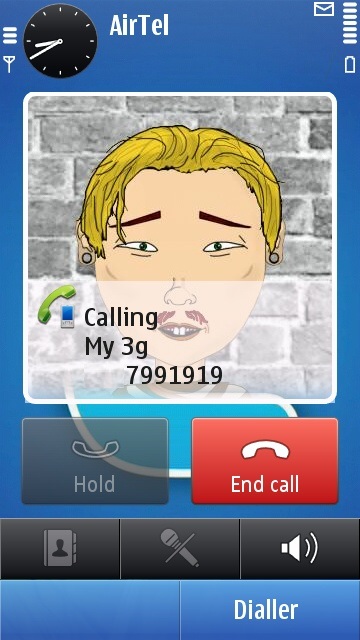
Download Geeky Avatar Apps for Nokia N8 Free- Nokia Smartphones, Do you ever know about Geeky Avatar? Geeky Avatar is an application for our Nokia N8 and any some other Symbian^3 device, that we are able to make elegant funny avatars for the contacts of Nokia N8. Answer calls with enjoyment when viewing cool interesting avatars. Make it possible for your mates be great and colorful in your nokia smartphone like in reality. 
Download Geeky Avatar Apps for Nokia N8 Free
To set up geeky avatar apps is really simple, begin with select the sex of the avatar, after that pick the color and shape of face, ears, nose, mouth, eyes and also some other accessories. When you set up the avatar, simply check-out “Options” and touch on “Add to Contact” to choose the contact you wish to create the different avatar.

For your information, Geeky Avatar can be found free - it will display advertisements and it need an Internet connection in Ovi Store, and without ads for 1.06 euros. You can download Geeky Avatar for free on Ovi Store here.

How to Set Up 6 Home screens on Nokia N8

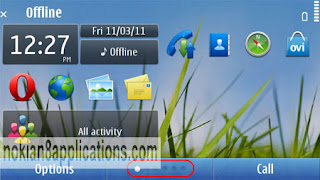
How to Set Up 6 Home screens on Nokia N8- Nokia Smartphones, allow me to explain how to set up 6 (six) homescreens. You know that set up the 3 home screens on Nokia N8 or any other Symbian^3 device is really easy, right now we are going to discover ways to set up 6 home screens on our device.
How to Set Up 6 Home screens on Nokia N8
Notes before you set up 6 home screens:
This method will remove your phone’s settings, but doesn't delete files or apps installed in C:\ or E:\
All of responsibility for what could happen to your device is yours and yours alone. lol
Tips Set Up 6 home screens on Nokia N8 or another symbian ^3 operating system device :
  1. First, You must download and unzip the file 200159c0.
  2. After that you have to connect your nokia phone to your PC in mass storage mode. Automatically it connects as “Nokia Ovi Suite”. To operate as Mass Storage to go to “Menu> Settings> Connectivity> USB” and pick “Mass storage”. If you do this, Ovi Suite must be closed in the Computer (Laptop, Notebook) or connects quickly in Ovi Suite mode.
  3. Okay now you must go from the PC to the phone memory, E:\Private\200159c0 and copy the contents of the directory you have unzipped previously (install and import). In cases where no exists the folder, copy the folder (200159c0) to E:\Private.
  4. Next go to “Menu> Settings> Phone> Phone management> Factory settings> Restore”. In case explained that you have to close every connections, press the Power and set up in “Offline. “
  5. Soon after rebooting the nokia phone, press Options from the desktop and select “New Home screen”. And what do you look now? You have 6 homescreens on your nokia N8 !.