Download Nokia N8 Debenhams App Review- Nokia Smartphones, we have observed a few wonderful applications for Symbian ^3 previously few weeks, with many different large companies queuing up to launch apps for products such as the Nokia N8. Debenhams is the newest, with its app to help you to purchase on the go, where ever you are. Come along following the break to discover when the Nokia N8 Debenhams app is worthwhile.
The home screen about the Debenhams app is vibrant, colourful and thoroughly clean. It features a simple to use menus, including the following choices: Shop All, Store Sale, Wish Checklist, Gift Finder, Keep in touch, Store Finder as well as Exit. You can also click on the bottom left part of the screen to determine any items that you’ve put into your shopping bag/order.
The store All section may be the part of the app you’ll end up being wanting to use when you initially go shopping. It takes you to definitely a sub-menu, letting you look for the types of item you would like, from Womens clothing, to Lingerie, in order to Mens’ and Kids’ clothes. You’ll additionally find Beauty, Presents and Toys, House and Furniture as well as Electricals.
Click on one of the over, and you’ll be able to look for the exact type of clothes you’re after, again having a huge choice available. Pick something you prefer, and you’ll be able to look at photographs of it, examine sizes, and supplment your shopping bag. You may also check for other items within the range.
Shop Purchase comes up with a comparable list of options, however this time with items which are on sale. Together with displaying the old cost, you’ll get to check out the purchase prices, and pictures of items. Click on all of them, and you’ll be able to look at more photographs or even add them to your own bag.
Once you’ve noticed the items you want, as well as added them to your own bag, it’s time to spend. You can click on the Check out option from your tote, but you’ll also have to sign-up before you can go any more. Once you have, you can easily invest in your items, and even have them delivered, all in the comfort of your couch using your Nokia N8.
The Keep in touch feature lets you type on a webpage with all of your particulars, so you can get updates associated with store offers and purchasers. The Store Finder web page simply lists the actual locations of Debenhams shops - it would happen to be nice to find Gps navigation functionality to determine the closest store, but it’s nevertheless easy to navigate as well as works well.
Whenever you want, you are able to click a Back again button to return to the prior page, and a House button to return to the start menu. All the buttons are large and easy to push, and navigating the actual app couldn’t be simpler. The only downside is deficiencies in a search function -- so you’ll have to choose products by kind, rather than being able to look for specific items.
General, the new Debenhams app is simple to use, and a good app. It’s a pity there’s no integrated research function (or all of us couldn’t believe it is if there is!), however it’s still easy to get around the store, with products clearly defined as well as split into different areas. If you’re into buying, Debenhams is an excellent option for your Nokia N8. You can download Debenhams App for your nokia N8 free here.
Showing posts with label Nseries. Show all posts
Showing posts with label Nseries. Show all posts
Thursday, March 24, 2011

My Review of the Nokia Silicone Cover CC-1005 (Blue)

Typically the CC-1005, because the title indicates, can be a silicon situation produced especially for the actual N8 which is Nokia’s very first venture towards the silicon situation organization, that typically has only already been regarding situations made from leather-based or even material. The actual 1005 will come in 4 colours, (nearly) matching some colours designed for the actual N8: Azure, Darkish, Eco-friendly along with a Pinkish Red-colored. I just say “almost,” simply because even though Nokia is providing the actual Red-colored CC-1005 colour, there isn't any matching Red N8. You may already know at this time the actual N8 emerges inside Lemon, therefore it’s the mysterious in my experience the reason why Nokia wasn’t in a position to produce a matching situation. In the event that you’re the master of the actual Lemon N8, you’re practically at a complete reduction right here, if you don't prefer to get satisfied with the actual Pinkish Red-colored colorization or even pick one in the additional 3 colors.
In comparison with more affordable plastic instances you discover on Auction web sites, the actual 1005 supplies a situation that’s much less large or even as well slender, however still this effective in keeping it’s type with out deforming in the simple behave associated with getting rid of it. In contrast to the particular individuals truly large silicon instances, including method to a lot supplies, the actual 1005 has become it really correct along with the ideal quantity of cushioning without having searching as well large. However you will find people instances which are way too slim which tremble as well as change merely through keeping the unit, this isn't the situation while using CC-1005.
Truly worth seeing nonetheless, is always that this particular sculpt associated with Azure is extremely a little diverse from nowhere fast about the N8 by itself, going for a more dark Blue rather than the N8’s a lot more natural gentle Glowing blue. Within the picture on the person can’t very notice the accurate tone related to Azure from the scenario, however what you could notice would be that the 2 colors don’t very complement totally. For many this ought to be great as well as general it'll appear good about the N8, nevertheless individuals searching for the shades to complement precisely may need to look somewhere else. The situation may also be super easy to use as well as consider associated with in addition to doesn’t include any kind of measureable lbs towards the N8. What it really includes nevertheless is a lot needed hold since the N8 is definitely a slick gadget.
Concerning the back again you will find cutouts for your digital camera, Xenon expensive, presenter as well as back microphone. The situation additionally ads several additional millimeters towards the elevation in the digital camera isle, basically developing a greater “wall” for your zoom lens, increasing just a little greater associated with a flat work surface, which makes it a little more extremely difficult to find damaged. A pleasing contact may be the precious metal Nseries logo design involved alone, just a little fine detail that you just won’t effortlessly on the more affordable silicon situation.
Concerning the remaining aspect it has an starting for the mini usb as well as obtaining gentle, however strangely not really for that microSD/SIM minute card position. Of course these kinds of aren’t capabilities that many people is going to be utilizing often, however in the situation you must do, it could end up with annoying needing to continuously get rid of the situation to gain use of these functions. 1 cause they may did that is to possess a much more far better fitted situation. Obtaining bigger opportunities signifies that general framework is similar to in order to flex as well as free it’s form after a while.
About the correct element, there’s a dent for that fasten change plus they really additional additional particulars such as image displaying in which the digital camera change is actually as well as producing 2 elevated humps for that quantity, just like upon quantity change from the N8.
The situation provides all of the required beginning for that High-definition multimedia user interface interface as well as 3.5mm jack port. An elevated area for that energy change ought to allow you to certainly switch on the actual N8, even total night.
Overview
A good always-on silicon scenario is ideal for a tool such as the N8. letting you rapidly think about pictures with out really stressing regarding flaps as well as getting it of the scenario as well as in the procedure missing which once-in-a-lifetime chance. Inside common Nokia style, the grade of the actual 1005 is kilometers more than additional less expensive situations, however perform anticipate paying a significant high quality for almost any real Nokia situation, even if it’s only a silicon scenario. The actual CC-1005 appear great and it has cutouts for many top features of the actual N8. Oddly these folks chose to not really contain opportunities for that microSD/SIM minute card position. I’m unsure the key reason why these people do this specific, however by the large room both of these beginning might consider, these folks most likely chose to quit this particular with regard to common much better fitted in addition to more powerful situation.
The particular CC-1005 offers good amazing details like the precious metal Nseries logo design about the again Azure excellent effect it increases the Selections switch even though this the color doesn’t completely complement nowhere fast from the N8, it will enhance the actual N8’s general attractive appears. I actually do wish they provided the lower a little slimmer and so the N8 might remain assemble such as additional situations, however in the finish, in spite of a few little issues, the actual Nokia CC-1005 has become the finest situation available for which Nokia N8. This will get the 9.Eight from 10.
Pros Nokia Silicone Cover CC-1005 (Blue)
- Adds necessary hold
- Always-on security
- This include any kind of quantifiable lbs
- The materials isn’t in order to large or even slim like a few less expensive plastic situation
- The Nseries logo design can be a good contact
- Opening for a lot of perform from the N8.
- Raised Camera as well as Energy Change.
Cons Nokia Silicone Cover CC-1005 (Blue):
- Colors doesn’t completely complement the particular N8
- No Lemon CC-1005
- No starting with respect to microSD/SIM greeting card placement
- The N8 can’t remain erect while using situation upon.
Thursday, March 17, 2011
Download Socially 3.05 for Nokia N8 or Symbian^3 Device
Download Socially 3.05 for Nokia N8 or Symbian^3 Device- Nokia Smartphones, Do you ever heard about socially app? Socially is usually a application for Facebook, Twitter, Linkedin and Foursquare. Socially at this moment launched version 3.0.5 Beta for the Nokia N8 or another Symbian^3 device, along with bug repairs and developments on Twitter, Foursquare and Facebook.

For your information, Socially is a cell phone application that allows you to monitor lots of the friends you're linked to on several social networking sites. Feel free to use Socially to trace latest activity of friends on various social networking sites. In facts, Socially additionally demonstrates to you up-to-date social understanding of the callers throughout an incoming call and also as notifies on the mobile phone desktop (home) screen, making it possible to have greater interactions.
Here are Changelogs of Socially app for Nokia N8 or Symbian^3 device::
- Facebook: Increased UI for looking at pictures and capability to comment and like pictures.
- Twitter: Innovative tweets instantly displayed in Timeline, Mentions, Profile, Trends and Search results and not having to refresh your mobile phone screen.
- Foursquare: Power to additionally publish your Shouts and Check-ins to Facebook and Twitter.
- Desktop Alerts: Approximately twenty five alerts every five minutes and Power to turn-off the audio for alerts
- Bug fixes: Fixed irregular problems relevant to Twitter Search and Trends for non-English languages
A few Nokia N8/C7 Affected by Display Issues

The Finns consider selling a hundred and fifty million Symbian handsets in the long term previous to they create the change to the Windows Phone platform for bigger-end items, but the production problems could obstruct the company's initiatives. At present, Nokia remains the world's primary mobile phone producer, however its footprint is mainly not in the US. It is designed to improve its United State existence and a lot not too long ago marketed the N8 throughout the Oscars despite it not being offered sponsored on any carrier in the States. At the moment, the 12-megapixel camera cell phone could be had for $329 through Dell's site.
Monday, March 14, 2011
Download Sucker Punch on Nokia N8 Free
Download Sucker Punch on Nokia N8 Free- Nokia Smartphones, I want to share about Sucker Punch. Sucker Punch continues to be explained its director, Zack Snyder, to be ‘Alice in Wonderland with machine guns’. Make use of them be machine guns not too small to take down huge Samurai, dragons and many types of other craziness. It is possible to download Sucker Punch on your Nokia N8 thanks to Nokia Ovi Store. Take a look at how to download Sucker Punch for free in this article.

For your information, Sucker Punch follows a teenage lady from the 50s gonna be lobotomized after being institutionalised by her evil stepfather. Retreating with an option actuality like a coping tactic, the lady envisions an idea which supports her avoid through the facility. Seeing that this lady tries to get away the asylum she phone calls upon the assistance of her friends and other inmates.
Download Sucker Punch Free here on your Nokia N8 and you can fell that it seems excellent. Pictures are well-defined and the soundtrack beating. Considering in at just below 12MB it’s worthfinding Sucker Punch by using Wi-Fi besides working your 3G connection, you can download Sucker Punch easily.
Saturday, March 12, 2011
Download New Update Nokia Reader for Nokia N8
Download New Update Nokia Reader for Nokia N8- Nokia Smartphones, I ever posted about download nokia reader RSS 1.0 beta one month ago,but now Nokia Reader, is updated to version 1.0.1 for our Nokia N8 or any other Symbian^3 device. With this updated to version 1.0.1, Nokia Reader is better, fixing some bugs of connectivity, but there is however still the issue in Symbian^3 version that at the time of start-up Reader application perhaps minimized to background.
Note: Before installing Reader 1.0.1 beta you have to first install Ovi Notifications Support Package (ONSP) v1.1.11106.

Here are Changelogs new update nokia reader:
- Correction for the troubles with Nokia account.
- Upgrades for the connectivity problems familiar with Nokia Reader version 1.0b.
Download Geeky Avatar Apps for Nokia N8 Free
Download Geeky Avatar Apps for Nokia N8 Free- Nokia Smartphones, Do you ever know about Geeky Avatar? Geeky Avatar is an application for our Nokia N8 and any some other Symbian^3 device, that we are able to make elegant funny avatars for the contacts of Nokia N8. Answer calls with enjoyment when viewing cool interesting avatars. Make it possible for your mates be great and colorful in your nokia smartphone like in reality.
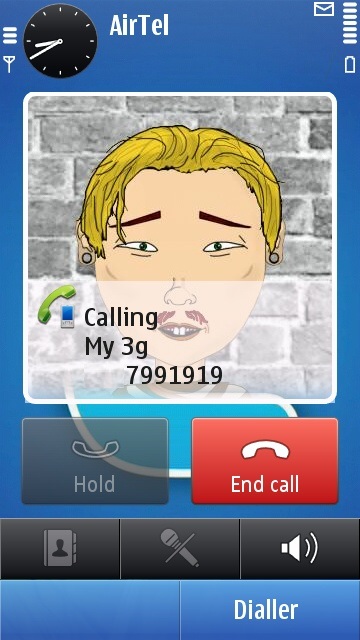
To set up geeky avatar apps is really simple, begin with select the sex of the avatar, after that pick the color and shape of face, ears, nose, mouth, eyes and also some other accessories. When you set up the avatar, simply check-out “Options” and touch on “Add to Contact” to choose the contact you wish to create the different avatar.
How to Set Up 6 Home screens on Nokia N8
How to Set Up 6 Home screens on Nokia N8- Nokia Smartphones, allow me to explain how to set up 6 (six) homescreens. You know that set up the 3 home screens on Nokia N8 or any other Symbian^3 device is really easy, right now we are going to discover ways to set up 6 home screens on our device.
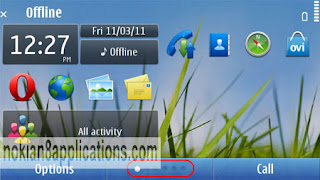
Notes before you set up 6 home screens:Tips Set Up 6 home screens on Nokia N8 or another symbian ^3 operating system device :
This method will remove your phone’s settings, but doesn't delete files or apps installed in C:\ or E:\
All of responsibility for what could happen to your device is yours and yours alone. lol
- First, You must download and unzip the file 200159c0.
- After that you have to connect your nokia phone to your PC in mass storage mode. Automatically it connects as “Nokia Ovi Suite”. To operate as Mass Storage to go to “Menu> Settings> Connectivity> USB” and pick “Mass storage”. If you do this, Ovi Suite must be closed in the Computer (Laptop, Notebook) or connects quickly in Ovi Suite mode.
- Okay now you must go from the PC to the phone memory, E:\Private\200159c0 and copy the contents of the directory you have unzipped previously (install and import). In cases where no exists the folder, copy the folder (200159c0) to E:\Private.
- Next go to “Menu> Settings> Phone> Phone management> Factory settings> Restore”. In case explained that you have to close every connections, press the Power and set up in “Offline. “
- Soon after rebooting the nokia phone, press Options from the desktop and select “New Home screen”. And what do you look now? You have 6 homescreens on your nokia N8 !.
Friday, March 11, 2011
Wew ! Nokia N8 Controlled BeeWi Mini Cooper S
Wew ! Nokia N8 Controlled BeeWi Mini Cooper S - Nokia Smartphones, we come across Nokia N8 remote controlled house in the past, still the continue one we want to observe that Nokia N8 can controll BeeWi Mini Cooper S, driving on a actual street. This kind of series presentsthe exact same functionality - offering 100 % handle remotely using your Nokia N8's touch screen - however in a little and less expensive deal.
Come along after the rest to learn just in case the BeeWi Mini Cooper S is virtually any excellent.
Showing on the BeeWi Mini Cooper S is excellent -belonging to the car headlights into the wheel arches within the exhaust, lots of the popular BMW Mini functions are provide and accurate - also it seems wonderful. Construction is a little plasticy, but this is not automatically a poor problem. Certainly, it would be awesome to touch when the BeeWi Mini Cooper S was created using metal, yet it might also be more heavy - a little something that would be seen when driving a car around as it would be not so quick and extra sluggish.
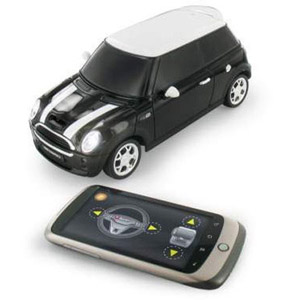 Earlier than you are able to get going, you will must set up the software for the BeeWi Mini on your touchscreen Symbian Nokia. Combined with the Nokia N8, the BeeWi Mini is usually that will work with various other Symbian devices - so consider Mobilefun to view additional suitable mobile phone models. And now to run the software, we earliest experimented with making use of the CD that included the car. There seemed to be no sign of Symbian software on the CD, however, therefore we approached BeeWi to discover how to proceed. As opposed to the CD, yo wi’ll must install the BeeWi application from the Ovi Store - yes, this process works out as good as transferring software from a Computer, but it would've been good to understand about it until now.
As soon as you have downloaded the software, start the application, switch on Bluetooth when requested, and make certain your Mini Cooper S is switched on (there is a activate the bottom). You will be requested to choose a car - pick the BeeWi Mini. Once yo have succeeded in doing so, you’re ready to go.
To manage the BeeWi Mini, you are going to view an onscreen steering wheel, and accelerator and brake peddles. You do not surely have to transform the wheel to move right or left - basically tap the right or left side and it reacts quickly. Sadly, you are able to just press one button at one time, so that you will not be able to speed up, brake pedal or steer at the same time (resulting in crashes).
The good news is, BeeWi has also offered software to help by tilting your Nokia N8. Just tilt ahead for speeding, backwards for reverse, and tilt the nokia N8 phone left or right to steer. In contrast to the touch buttons, you possibly can tilt the device in various instructions to maneuver and steer at one time, so it is far more enjoyable. It is very difficult to manage - showing a very little too ‘all or nothing’, yet it's great exciting when used in restricted locations. You can check again how Nokia N8 can controll BeeWi Mini Cooper S in the video (review again..).
Finally, we want to say that the BeeWi Mini Cooper S is a excellent little game. It is good to be able to control via your Nokia N8- with no the require for any cumbersome controller - and you will also reduce devices to charge or purchase batteries for. As a result, the Mini isvalued at looking at if you’re in the market for a little remote controlled toy for work with around the home.
Via Techradar
Come along after the rest to learn just in case the BeeWi Mini Cooper S is virtually any excellent.
Showing on the BeeWi Mini Cooper S is excellent -belonging to the car headlights into the wheel arches within the exhaust, lots of the popular BMW Mini functions are provide and accurate - also it seems wonderful. Construction is a little plasticy, but this is not automatically a poor problem. Certainly, it would be awesome to touch when the BeeWi Mini Cooper S was created using metal, yet it might also be more heavy - a little something that would be seen when driving a car around as it would be not so quick and extra sluggish.
As soon as you have downloaded the software, start the application, switch on Bluetooth when requested, and make certain your Mini Cooper S is switched on (there is a activate the bottom). You will be requested to choose a car - pick the BeeWi Mini. Once yo have succeeded in doing so, you’re ready to go.
To manage the BeeWi Mini, you are going to view an onscreen steering wheel, and accelerator and brake peddles. You do not surely have to transform the wheel to move right or left - basically tap the right or left side and it reacts quickly. Sadly, you are able to just press one button at one time, so that you will not be able to speed up, brake pedal or steer at the same time (resulting in crashes).
The good news is, BeeWi has also offered software to help by tilting your Nokia N8. Just tilt ahead for speeding, backwards for reverse, and tilt the nokia N8 phone left or right to steer. In contrast to the touch buttons, you possibly can tilt the device in various instructions to maneuver and steer at one time, so it is far more enjoyable. It is very difficult to manage - showing a very little too ‘all or nothing’, yet it's great exciting when used in restricted locations. You can check again how Nokia N8 can controll BeeWi Mini Cooper S in the video (review again..).
Finally, we want to say that the BeeWi Mini Cooper S is a excellent little game. It is good to be able to control via your Nokia N8- with no the require for any cumbersome controller - and you will also reduce devices to charge or purchase batteries for. As a result, the Mini isvalued at looking at if you’re in the market for a little remote controlled toy for work with around the home.
Via Techradar
Saturday, March 5, 2011
Download Layar Reality Browser for Symbian
Download Layar Reality Browser for Symbian-Nokia Smartphones, when I was searching info new apps for my nokia N8, I found news that Layar has announced today. Yes, the new release of Layar Reality Browser for Symbian devices, an augmented reality experience for users of S60 and Symbian^3 devices with GPS, front-facing camera, compass and also accelerometer.
For your information, Layar Reality Browser is currently compatible with Symbian^3 (Nokia N8, Nokia C7, Nokia C6-01, and also Nokia E7) and Symbian S60 (Nokia N97, Nokia N97-mini). Make sure your nokia phone is compatible with this apps.
You can download Layar Reality Browser for free at Ovi Store.
For your information, Layar Reality Browser is currently compatible with Symbian^3 (Nokia N8, Nokia C7, Nokia C6-01, and also Nokia E7) and Symbian S60 (Nokia N97, Nokia N97-mini). Make sure your nokia phone is compatible with this apps.
You can download Layar Reality Browser for free at Ovi Store.
Thursday, March 3, 2011
Latest Ovi Maps 3.06 for Social Network Lovers
Latest Ovi Maps 3.06 for Social Network Lovers- Nokia Smartphones, for you who really like the social networking service based Foursquare or Facebook Places, you can have fun enjoying the new Ovi Maps. Yes, Ovi Maps has been updated to version 3.06 by Nokia Beta Labs and can run on NokiaN8 smartphone, Nokia C6-01, Nokia C7, Nokia E7, and S60 5th Edition mobile phone.

For your information, new updates Ovi Maps is not beta version, but is freely download available on Ovi Store or directly from Beta Lab. In my opinion, nothing is too much change at 3.06 on Ovi Maps update, unless indeed the user can check in with a variety of location-based services, including Facebook. If you do not know the latest version ovi maps on your nokia, you can read tutorial how to check the latest version of ovi maps.
This additional new feature is that users can mix and check in between Foursquare Qype check-in. But unfortunately, it can be used only for Nokia devices running Symbian^ 3 operating system, or S60 5th Edition.
This additional new feature is that users can mix and check in between Foursquare Qype check-in. But unfortunately, it can be used only for Nokia devices running Symbian^ 3 operating system, or S60 5th Edition.
Monday, February 28, 2011
Nokia N950 Preparing This Year, Smartphone Based MeeGo
Nokia N950 Preparing This Year, Smartphone Based MeeGo-Nokia Smartphones, although already decided to partner with Microsoft and using Windows Phone 7 for next-generation smartphone, Nokia is rumored to still be setting up a device in 2011 based MeeGo this. Nokia also said to remain committed to Symbian, Qt, as well as S40-based devices.
Rich Green as Nokia CTO at Nokia Developer Day event to give a lengthy explanation on the Nokia platform now and future, including MeeGo. He said they are currently working hard to make the Nokia N950, N900 successor MeeGo-based device, which is said to have hardware that is very elegant and attractive interface.
Consider the following video:
Green assured the developers who attend that Nokia N950 has enough units to be developed. N950 seems to be intended more as a development platform rather than to general market users. This is not surprising considering MeeGo indeed been prepared to explore the long-term market.
Nokia's strategy is still based on the development of Qt for the Symbian and MeeGo, added further support for Java in S40. Symbian S40 platform itself will get a new browser Ovi which are expected to provide connectivity to hundreds of millions of users.
This news at least be a consolation disappointment MeeGo lovers because Nokia probably have to cancel the Nokia N9-called new device based MeeGo. Nokia did not even show the new device at MWC 2011 past events that seemed to indicate there is no new innovation in the largest mobile phone company in the world.
Friday, February 25, 2011
Download Fruit Ninja Game for N8 and C7
Download Fruit Ninja Game for Nokia N8 and Nokia C7- Nokia Smartphones, one more successful mobile game in the iOS will expand its services. Fruit Ninja, one of the favorite games in the iOS device other than Angry Birds eventually be used for Symbian devices.
Launched by GSM Arena, Friday (02/25/2011), Fruit Ninja game itself is full of action game featuring fruit that we should cut the fruit bouncing bombs while avoiding the wrong cut. This game will be available through the Ovi Store for Symbian^3 phones , ie Nokia N8 and Nokia C7. But not yet known whether it will also be present in another smartphone. I have tasted in my nokia N8, and I can download it. To download ninja game, you can read my last post about how to download games from ovi store to PC.
In the Fruit Ninja Symbian version, no new additional levels. But there are also challenges to be faced by the ninja warriors of fruit in three modes provided. The game its popularity continues to increase since the initial launch. If you want to enjoy this addicted game, please download it directly to http://store.ovi.com/content/101584.
Sunday, February 20, 2011
Personalizing Your Ovi Maps on Nokia
Personalizing your ovi maps- Nokia Smartphones, in addition to map downloads, Nokia’s ovi suit can be used to download voice files for voice guidance in drive and walk navigation. Just select “ Voice Guidance Languages”. Hit download and you’re away. Turn by turn directions are great for helping you get from A to B smoothly, but they are not ideal when the voice guiding you is in a different language as it may mean you are concentrating more on working out what the last world instruction meant rather than on the road ahead.
Thankfully, Ovi Maps can serve up voice guidance instructions in almost 50 languages. Just visit the nokia ovi suit for a list of supported languages, then simply download the one you want and you are ready to roll.
If you want to make things a bit more interesting, the own voice app could help. You can download this application from the ovi store. This practical navigation aid is also a whole lot of fun. It lets you record and share your own voice prompts as well as using the dulcet tones of your friends and family to help to guide you, too.
You just need the latest version of ovi maps in order to take advantages of what the app has to offer. At the time off publication, there was a whole host of pre-recorded voice packages to choose from that others have uploaded to the own voice website. Some of our particular favourites include the drill sergeant, who barks orders at you and expects you to obey his every instruction; the racing commentator, who adds that extra bit of excitement to your journey and the hairdresser, whose main aim is to get you to your destination feeling pampered and relaxed.
- Getting own voice up and running on your handset couldn’t be easier:
- Check whether your handset is compatible using the widget on the own voice website.
- Download Ovi maps if you have not already done so
- Download the own voice app from the ovi store
- Fire up the own voice app
- Follow the step-by-step instructions to record your own voice
- Press stop after each instruction so you know you have got it right
- Start using your voice recording to help guide you. To get it working, go to ovi maps > settings > navigation > drive guidance and select own voice
- Share the recording with other users if you want to by uploading it to the website
Okay, now you can practice to personalizing your ovi maps on your nokia smartphones.
Subscribe to:
Posts (Atom)


