Showing posts with label Nokia N8. Show all posts

Tuesday, April 19, 2011

App for Nokia N8, Soundtrckr v1.3

httIts too long to not update my blog, hmmm, but I am really surprise that my alexa blog is increasing day by day. thanks alexa!

Okay back to topic, Yesterday I tried the app from nokia store, named Soundtrckr, the first Geosocial Internet Radio, is updated to version 1.3 for our Nokia N8 or any other Symbian^3 device. This new version has new features, as Instant and predictive search, and bug fixes. This app have tried by me at nokia N8.

Features of Soundtrckr :

  1. Listen to more than 8 million fully licensed songs – any artist, any genre, anytime
  2. Create and share personal radio stations
  3. Play music with friends in real time
  4. Search your city for popular music and people with similar taste
  5. Share your favorite stations on social networks

Changelog v1.3 Soundtrckr:

  1. Instant and predictive search on Soundtrckr catalogue of 1M artis
  2. Faster station creation process
  3. First song for any existing station will come from the artist the station has been created with
  4. T-Mobile USA and Orange UK sign-in fix
  5. Performance and other bug fixes

How to install Soundtrckr: Download the .zip file to your PC and extract the .jar and .jad files to a folder on your PC.
  • Transfer both the .jar and .jad files to your mobile device over Bluetooth or USB.
  • On your mobile device browse to the location where you saved the .jad and .jar files.
  •  Install the application by selecting the .jar file.

Monday, April 4, 2011

Review KFBoy Nokia N8 Game Free Download

Review KFBoy Nokia N8 Game Free Download- Nokia Smartphones, In this post I will review a new game for your nokia N8, named KFBoy. KFBoy Game is free for download in limited time. Its created by Taiwan-based software company, Auer.
Review KFBoy Nokia N8 Game Free Download

In my opinion, KFBoy game is quite easy, just battle, kick and fight. In case you store enough power, it is possible to press the “Transfiguration” button. You can find four rivals you must struggle. P.S. The Overall Game is just available on picked market, for instance, Taiwan and Hong Kong.

You can download KFBoy Game for free at nokia ovi store. Enjoy!

Symbian Twitter App: Different Tack, Free For Limited Time

Symbian Twitter App: Different Tack, Free For Limited Time
Symbian Twitter App: Different Tack, Free For Limited Time- Nokia Smartphones, Different Tack is a innovative fresh Twitter client that creates browsing your tweets less difficult and exciting! You will observe what’s hot with just a glance and browse through your tweets using a notch of your browse.

Different Tack can be purchased for free for a limited time. Have it currently and turn your information overflow into a data flow. Different Tack accesses your Twitter account. Your Operator may charge for mobile data transfer. You can download different tack app free at nokia ovi store.

Thursday, March 31, 2011

Release Nokia Sleeping Screen for Nokia N8 Download Now !

Release Nokia Sleeping Screen for Nokia N8 Download Now !- Nokia Smartphones, Nokia Beta Labs launches a fresh application for our Nokia N8 or any other Symbian^3 device, which really can be very beneficial. This is Nokia Sleeping Screen v0.50.1, a screen saver with beautiful graphics, status indications at an appearance such as battery status, missed calls or SMS received, and a calm nighttime clock.

It's process is very easy:

  1.  Go for Nokia Sleeping Screen from Settings >> Themes >> Screen saver menu
  2.  Pick your preferred screen saver look from Nokia Sleeping Screen settings view
  3. Tap the night clock -thumbnail to activate/deactivate night clock and to set the time period when the night clock -mode is automatically turned on.

To work with Nokia Sleeping Screen we've installed Qt 4.6.4 or Qt 4.7.2, this is certainly downloaded from here. You should be aware that installing this may perhaps  that a few applications don't function, as Ovi Store. You can download Nokia Sleeping Screen for Nokia N8 here.

Tuesday, March 29, 2011

Download Shoppinglist v1.1 App for Nokia N8 / E7 / C7

Download Shoppinglist v1.1 App for Nokia N8 / E7 / C7- nokia smartphones, two minutes ago, I posted about free download Burning Tires 3D Symbian^3 Game, now I will share you anew app from ovi store- named ShoppingList app. The ShoppingList app with regard to Symbian^3 devices including the Nokia N8, E7 as well as C7 acquired updated in order to v1.1. ShoppingList can be an software for Symbian^3 that enables the consumer to control his/her shopping listings in an orderly method.
Download Shoppinglist v1.1 App for Nokia N8 / E7 / C7

The application logic as well as interface are continual by JavaScript? and QML. The actual features is fairly simple: one can add/delete a grocery list, add/remove and check/uncheck products in their email list. A couple of measurement methods are accessible to select from within the Settings screen. Every list is recognized by a short explanation, while each item inside a list includes a title, quantity and calculating unit. A sample checklist and various list products are pre-included to let the consumer to receive familiar with the performance instantly.

You can view and download free Shoppinglist v1.1 App for Nokia N8 / E7 / C7 here.

Sunday, March 27, 2011

Buy and Download photo 3D app for Nokia N8

Buy and Download photo 3D app for Nokia N8 free
Buy and Download photo 3D app for Nokia N8- Nokia Smartphones, Find out just about any photo in 3D on nokia phone screen. Customize the dimension to your photographs (pictures, images, shots) with this app. Primary paint the depth for the photo only in couple of seconds and twist the device to view the photo in multiple dimensions. You can view the result of using photo 3D application in the pics. Okay now you download ((free and buy) photo 3D app for your nokia N8 at nokia ovi store.

Thursday, March 24, 2011

Download Nokia N8 Debenhams App Review

Download Nokia N8 Debenhams App Review- Nokia Smartphones, we have observed a few wonderful applications for Symbian ^3 previously few weeks, with many different large companies queuing up to launch apps for products such as the Nokia N8. Debenhams is the newest, with its app to help you to purchase on the go, where ever you are. Come along following the break to discover when the Nokia N8 Debenhams app is worthwhile.

The home screen about the Debenhams app is vibrant, colourful and thoroughly clean. It features a simple to use menus, including the following choices: Shop All, Store Sale, Wish Checklist, Gift Finder, Keep in touch, Store Finder as well as Exit. You can also click on the bottom left part of the screen to determine any items that you’ve put into your shopping bag/order.

The store All section may be the part of the app you’ll end up being wanting to use when you initially go shopping. It takes you to definitely a sub-menu, letting you look for the types of item you would like, from Womens clothing, to Lingerie, in order to Mens’ and Kids’ clothes. You’ll additionally find Beauty, Presents and Toys, House and Furniture as well as Electricals.

Click on one of the over, and you’ll be able to look for the exact type of clothes you’re after, again having a huge choice available. Pick something you prefer, and you’ll be able to look at photographs of it, examine sizes, and supplment your shopping bag. You may also check for other items within the range.

Shop Purchase comes up with a comparable list of options, however this time with items which are on sale. Together with displaying the old cost, you’ll get to check out the purchase prices, and pictures of items. Click on all of them, and you’ll be able to look at more photographs or even add them to your own bag.

Once you’ve noticed the items you want, as well as added them to your own bag, it’s time to spend. You can click on the Check out option from your tote, but you’ll also have to sign-up before you can go any more. Once you have, you can easily invest in your items, and even have them delivered, all in the comfort of your couch using your Nokia N8.

The Keep in touch feature lets you type on a webpage with all of your particulars, so you can get updates associated with store offers and purchasers. The Store Finder web page simply lists the actual locations of Debenhams shops - it would happen to be nice to find Gps navigation functionality to determine the closest store, but it’s nevertheless easy to navigate as well as works well.

Whenever you want, you are able to click a Back again button to return to the prior page, and a House button to return to the start menu. All the buttons are large and easy to push, and navigating the actual app couldn’t be simpler. The only downside is deficiencies in a search function -- so you’ll have to choose products by kind, rather than being able to look for specific items.

General, the new Debenhams app is simple to use, and a good app. It’s a pity there’s no integrated research function (or all of us couldn’t believe it is if there is!), however it’s still easy to get around the store, with products clearly defined as well as split into different areas. If you’re into buying, Debenhams is an excellent option for your Nokia N8. You can download Debenhams App for your nokia N8 free here.

My Review of the Nokia Silicone Cover CC-1005 (Blue)

My Review of the Nokia Silicone Cover CC-1005 (Blue)
My Review of the Nokia Silicone Cover CC-1005 (Blue)- Nokia Smartphones, Do you really need great accessories for your Nokia N8? Trendy? Stylish? Less Expensive? So, you can buy Nokia Silicone Cover CC-1005 blue for your Nokia N8. Here are some informations about Nokia Silicone Cover CC-1005. Similar to a camera-centric gadget, the particular N8 almost recommends with an “always-on” situation which doesn’t need continuously remove it and hang this in, matching the actual N8’s “ready in order to shoot” point of view. Might Nokia’s personal Plastic Consist of CC-1005 end up being which position?

Typically the CC-1005, because the title indicates, can be a silicon situation produced especially for the actual N8 which is Nokia’s very first venture towards the silicon situation organization, that typically has only already been regarding situations made from leather-based or even material. The actual 1005 will come in 4 colours, (nearly) matching some colours designed for the actual N8: Azure, Darkish, Eco-friendly along with a Pinkish Red-colored. I just say “almost,” simply because even though Nokia is providing the actual Red-colored CC-1005 colour, there isn't any matching Red N8. You may already know at this time the actual N8 emerges inside Lemon, therefore it’s the mysterious in my experience the reason why Nokia wasn’t in a position to produce a matching situation. In the event that you’re the master of the actual Lemon N8, you’re practically at a complete reduction right here, if you don't prefer to get satisfied with the actual Pinkish Red-colored colorization or even pick one in the additional 3 colors.

In comparison with more affordable plastic instances you discover on Auction web sites, the actual 1005 supplies a situation that’s much less large or even as well slender, however still this effective in keeping it’s type with out deforming in the simple behave associated with getting rid of it. In contrast to the particular individuals truly large silicon instances, including method to a lot supplies, the actual 1005 has become it really correct along with the ideal quantity of cushioning without having searching as well large. However you will find people instances which are way too slim which tremble as well as change merely through keeping the unit, this isn't the situation while using CC-1005.

Truly worth seeing nonetheless, is always that this particular sculpt associated with Azure is extremely a little diverse from nowhere fast about the N8 by itself, going for a more dark  Blue rather than the N8’s a lot more natural gentle Glowing blue. Within the picture on the person can’t very notice  the accurate tone related to Azure from the scenario, however what you could notice would be that the 2 colors don’t very complement totally. For many this ought to be great as well as general it'll appear  good about the N8, nevertheless individuals searching for the shades to complement precisely may need to look somewhere else. The situation may also be super easy to use as well as consider associated with in addition to doesn’t include any kind of measureable lbs towards the N8. What it really includes nevertheless is a lot needed hold since the N8 is definitely a slick gadget.

Concerning the back again you will find cutouts for your digital camera, Xenon expensive, presenter as well as back microphone. The situation additionally ads several additional millimeters towards the elevation in the digital camera isle, basically developing a greater “wall” for your zoom lens, increasing just a little greater associated with a flat work surface, which makes it a little more extremely difficult to find damaged. A pleasing contact may be the precious metal Nseries logo design involved alone, just a little fine detail that you just won’t effortlessly on the more affordable silicon situation.

Concerning the remaining aspect it has an starting for the mini usb as well as obtaining gentle, however strangely not really for that microSD/SIM minute card position. Of course these kinds of aren’t capabilities that many people is going to be utilizing often, however in the situation you must do, it could end up with annoying needing to continuously get rid of the situation to gain use of these functions. 1 cause they may did that is to possess a much more far better fitted situation. Obtaining bigger opportunities signifies that general framework is similar to in order to flex as well as free it’s form after a while.

About the correct element, there’s a dent for that fasten change plus they really additional additional particulars such as image displaying in which the digital camera change is actually as well as producing 2 elevated humps for that quantity, just like upon quantity change from the N8.
The situation provides all of the required beginning for that High-definition multimedia user interface interface as well as 3.5mm jack port. An elevated area for that energy change ought to allow you to certainly switch on the actual N8, even total night.

Overview

A good always-on silicon scenario is ideal for a tool such as the N8. letting you rapidly think about pictures with out really stressing regarding flaps as well as getting it of the scenario as well as in the procedure missing which once-in-a-lifetime chance. Inside common Nokia style, the grade of the actual 1005  is kilometers more than additional less expensive situations, however perform anticipate paying a significant high quality for almost any real Nokia situation, even if it’s only a silicon scenario. The actual CC-1005 appear great and it has cutouts for many top features of the actual N8. Oddly these folks chose to not really contain opportunities for that microSD/SIM minute card position. I’m unsure the key reason why these people do this specific, however by the large room both of these beginning might consider, these folks most likely chose to quit this particular with regard to common much better fitted in addition to more powerful situation.

The particular CC-1005 offers good amazing details like the precious metal Nseries logo design about the again Azure excellent effect it increases the Selections switch even though this the color doesn’t completely complement nowhere fast from the N8, it will enhance the actual N8’s general attractive appears. I actually do wish they provided the lower a little slimmer and so the N8 might remain assemble such as additional situations, however in the finish, in spite of a few little issues, the actual Nokia CC-1005 has become the finest situation available for which Nokia N8. This will get the 9.Eight from 10.

Pros Nokia Silicone Cover CC-1005 (Blue)
  •     Adds necessary hold
  •     Always-on security
  •     This include any kind of quantifiable lbs
  •     The materials isn’t in order to large or even slim like a few less expensive plastic situation
  •     The Nseries logo design can be a good contact
  •     Opening for a lot of perform from the N8.
  •     Raised Camera as well as Energy Change.

Cons Nokia Silicone Cover CC-1005 (Blue):
  •     Colors doesn’t completely complement the particular N8
  •     No Lemon CC-1005
  •     No starting with respect to microSD/SIM greeting card placement
  •     The N8 can’t remain erect while using situation upon.
Original article review of the Nokia Silicone Cover CC-1005 (Blue) here. 

Tuesday, March 22, 2011

Download Opera Mini 6 and Opera Mobile 11 for Nokia N8

Download Opera Mini 6 and Opera Mobile 11 for Nokia N8- Nokia Smartphones, nowadays Opera has launched Opera Mini 6 and Opera Mobile 11 for Nokia N8 or some other Symbian^3 device. Nevertheless missing the changelog of either versions, despite the fact that we observed a few quite useful innovations. Here are new Features of Opera Mini 6 and Opera Mobile:
Download Opera Mini 6 and Opera Mobile 11 for Nokia N8 and Symbian^3 device

  •     Line Set.
  •     Share option.
  •     Pinch to zoom.
  •     Support for HTML5.
You can download Opera Mini 6 and Opera Mobile 11 for Nokia N8 here.

Sunday, March 20, 2011

Download Cake Mania- Main Street for Nokia N8

Download Cake Mania- Main Street for Nokia N8- Nokia Smartphones, Guide Jill and her best friends make plenty of money to revitalize Main Street in Cake Mania foor Main Street by handling and improving four unique downtown shops and building must-see places of interest, such as the World’s Biggest Cake, in this highly-anticipated sequel. You can download cake mania game for your nokia N8 here.

Thursday, March 17, 2011

How to Send Files Quickly from Nokia N8

How to Send Files Quickly from Nokia N8- Nokia Smartphones, Just about every single gadget includes a optimum file size support, the Nokia N8 for example, I never expert this sort of issue. Yet to generally be certain that any person certainly not results in this issue. WinRar for your Nokia N8 does the work. You can compress a file in your Nokia N8 previously sending it to any place. Songs data files might be big from time to time. You will find a further method that it's possible to quickly send data files to you pc. You can read how to link your PC to your Nokia  first.

As soon as the file is compressed, the data format is modified either to rar, .zip, .tar, .7z or .gzip. Your pc will be able to extract the entire file formats but my Nokia N8 is able to only extract .zip files. For those who aren’t considering following all of these ways, you certainly smartest choice would be to possibly copy or transfer the file to a USB or an external storage.

These two solutions are great but in the end of the day, I would like to have the file to my Computer so I could upload it, the quickest technique among these 2 is to copy the file to a USB or an external storage. To deliver a file to your Personal computer via e-mail could be busy that you need a WLAN connection or a data plan to move a file that huge.So its easy how to send files from the nokia N8, isn't?

A few Nokia N8/C7 Affected by Display Issues

A few Nokia N8/C7 Affected by Display Issues
A few Nokia N8/C7 Phones Affected by Display Issues- Nokia Smartphones, When I make status on twitter, I saw the update status Eldar Murtazin's twitter. He tweet about related to nokia N8 and nokia C7. You can check the picture.The Nokia N8 is perhaps the company's flagship, but issues with the handset have seriously affected the company since its release additionally they apparently carry on as a tweet by Russian tech expert Eldar Murtazin estimates an internal Nokia service bulletin exposing that mobile phones produced in December were “created along with defective displays.” The problem also impacts a lot more inexpensive Nokia C7 model, that happen to be starting T-Mobile as the Nokia Tiger, and definately will need a total replace of screens.

The Finns consider selling a hundred and fifty million Symbian handsets in the long term previous to they create the change to the Windows Phone platform for bigger-end items, but the production problems could obstruct the company's initiatives. At present, Nokia remains the world's primary mobile phone producer, however its footprint is mainly not in the US.  It is designed to improve its United State existence and a lot not too long ago marketed the N8 throughout the Oscars despite it not being offered sponsored on any carrier in the States. At the moment, the 12-megapixel camera cell phone could be had for $329 through Dell's site.

Wednesday, March 16, 2011

Boom Beats Game for Your Nokia N8

Boom Beats  Game for Your Nokia N8- Nokia Smartphones, If you have Nokia N8, you can play this game for fun. Boom Beats certainly a addictive beat game that will allows you to get into compelling sides filled with club songs: drum and bass, jungle, dub step, rave and house. Everything you should perform is touch the tempo and generate report. Apply multipliers, unlocks, specific powers and others. Headphones are advised.You can watch these video to understand how to play Boom Beats Gameplay with your Nokia N8.
You can download and buy Boom Beats Game here at Nokia Ovi Store.

Tuesday, March 15, 2011

Download Prisma 3D Game for Symbian ^3

Download Prisma 3D Game for Symbian ^3- Nokia Smartphones, Prism 3D is a wonderful game applies your nokia smartphone's accelerometer to trace a beach ball given it bounces down some 3D tiles, including your purpose should be to maintain it from slipping through the wayside.  It is method more difficult than it tones, that if you ask me is a huge advantage as it maintains the replay worth excessive.
Download Prisma 3D Game for Symbian ^3

Prism 3D, this game has stunning design, can be quite clean on my Nokia N8 and enjoyable as every get-out.  Include within an unlimited way of all of you who definitely are great at this one, along with a level editor for those of us who are certainly not, and I believe there is a actual success in this case. A brand new game for Symbian^3 phones is out. Check the video how to play Prism 3D for your symbian ^ 3. You can download prism 3D game for your symbian from nokia ovi store here.

Monday, March 14, 2011

Download Sucker Punch on Nokia N8 Free

Download Sucker Punch on Nokia N8 Free- Nokia Smartphones, I want to share about Sucker Punch. Sucker Punch  continues to be explained its director, Zack Snyder, to be ‘Alice in Wonderland with machine guns’. Make use of them be machine guns not too small to take down huge Samurai, dragons and many types of other craziness. It is possible to download Sucker Punch on your Nokia N8 thanks to Nokia Ovi Store. Take a look at how to download Sucker Punch for free in this article.
Download Sucker Punch Movie on Nokia N8 Free

For your information, Sucker Punch follows a teenage lady from the 50s gonna be lobotomized after being institutionalised by her evil stepfather. Retreating with an option actuality like a coping tactic, the lady envisions an idea which supports her avoid through the facility. Seeing that this lady tries to get away the asylum she phone calls upon the assistance of her friends and other inmates.

Download Sucker Punch Free here on your Nokia N8 and you can fell that it seems excellent. Pictures are well-defined and the soundtrack beating. Considering in at just below 12MB it’s worthfinding Sucker Punch by using Wi-Fi besides working your 3G connection, you can download Sucker Punch easily.

Sunday, March 13, 2011

How to Make Full Format Your Bricked N8

How to Make Full Format your bricked N8- Nokia Smartphones, Do you ever got "brick" problem after working to have fun with FontRouter on Nokia N8?. For that reason, I got information that there is way to recover it. Okay here is the solution to full format and create bricked N8 come alive for a second time:
  1. Now you must turn off your nokia N8 phone.
  2. After that Hold "Volume Down + Camera Key + Menu Key" and press power button till your Nokia N8 phone shake.
  3. Have to wait until display screen show correctly.
Make sure you be aware that I found these troubles after doing full format your bricked N8:

1. You can lost Ovi Maps. On the other hand, you could possibly reinstall it by download ovi maps here.
2. You can lost Ovi Store 2.0 and you can not reinstall it since it usually display "Unable to install".

Consequently make sure you do not do full format your bricked N8 if not required or really I must state that do it just as your last Decision.

Saturday, March 12, 2011

Download New Update Nokia Reader for Nokia N8

Download New Update Nokia Reader for Nokia N8- Nokia Smartphones, I ever posted about download nokia reader RSS 1.0 beta one month ago,but now Nokia Reader, is updated to version 1.0.1 for our Nokia N8 or any other Symbian^3 device. With this updated to version 1.0.1, Nokia Reader is better, fixing some bugs of connectivity, but there is however still the issue in Symbian^3 version that at the time of start-up Reader application perhaps minimized to background. 
Note: Before installing Reader 1.0.1 beta you have to first install Ovi Notifications Support Package (ONSP) v1.1.11106.
Download New Update Nokia Reader for Nokia N8
Here are Changelogs new update nokia reader:
  • Correction for the troubles with Nokia account.
  • Upgrades for the connectivity problems familiar with Nokia Reader version 1.0b. 
Okay, you can download and installation New Update Nokia Reader for free on Nokia Beta Labs here. 


Download Geeky Avatar Apps for Nokia N8 Free

Download Geeky Avatar Apps for Nokia N8 Free- Nokia Smartphones, Do you ever know about Geeky Avatar? Geeky Avatar is an application for our Nokia N8 and any some other Symbian^3 device, that we are able to make elegant funny avatars for the contacts of Nokia N8. Answer calls with enjoyment when viewing cool interesting avatars. Make it possible for your mates be great and colorful in your nokia smartphone like in reality. 
Download Geeky Avatar Apps for Nokia N8 Free
To set up geeky avatar apps is really simple, begin with select the sex of the avatar, after that pick the color and shape of face, ears, nose, mouth, eyes and also some other accessories. When you set up the avatar, simply check-out “Options” and touch on “Add to Contact” to choose the contact you wish to create the different avatar.

For your information, Geeky Avatar can be found free - it will display advertisements and it need an Internet connection in Ovi Store, and without ads for 1.06 euros. You can download Geeky Avatar for free on Ovi Store here.

How to Set Up 6 Home screens on Nokia N8

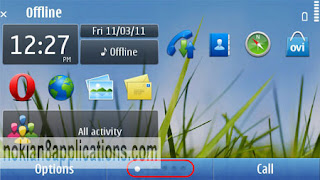
How to Set Up 6 Home screens on Nokia N8- Nokia Smartphones, allow me to explain how to set up 6 (six) homescreens. You know that set up the 3 home screens on Nokia N8 or any other Symbian^3 device is really easy, right now we are going to discover ways to set up 6 home screens on our device.
How to Set Up 6 Home screens on Nokia N8
Notes before you set up 6 home screens:
This method will remove your phone’s settings, but doesn't delete files or apps installed in C:\ or E:\
All of responsibility for what could happen to your device is yours and yours alone. lol
Tips Set Up 6 home screens on Nokia N8 or another symbian ^3 operating system device :
  1. First, You must download and unzip the file 200159c0.
  2. After that you have to connect your nokia phone to your PC in mass storage mode. Automatically it connects as “Nokia Ovi Suite”. To operate as Mass Storage to go to “Menu> Settings> Connectivity> USB” and pick “Mass storage”. If you do this, Ovi Suite must be closed in the Computer (Laptop, Notebook) or connects quickly in Ovi Suite mode.
  3. Okay now you must go from the PC to the phone memory, E:\Private\200159c0 and copy the contents of the directory you have unzipped previously (install and import). In cases where no exists the folder, copy the folder (200159c0) to E:\Private.
  4. Next go to “Menu> Settings> Phone> Phone management> Factory settings> Restore”. In case explained that you have to close every connections, press the Power and set up in “Offline. “
  5. Soon after rebooting the nokia phone, press Options from the desktop and select “New Home screen”. And what do you look now? You have 6 homescreens on your nokia N8 !.

Friday, March 11, 2011

Wew ! Nokia N8 Controlled BeeWi Mini Cooper S

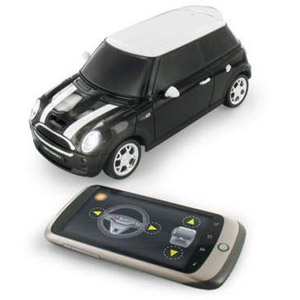
Wew ! Nokia N8 Controlled BeeWi Mini Cooper S - Nokia Smartphones, we come across Nokia N8 remote controlled house in the past, still the continue one we want to observe that Nokia N8 can controll BeeWi Mini Cooper S, driving on a actual street. This kind of series presentsthe exact same functionality - offering 100 % handle remotely using your Nokia N8's touch screen - however in a little and less expensive deal.

Come along after the rest to learn just in case the BeeWi Mini Cooper S is virtually any excellent.

Showing on the BeeWi Mini Cooper S is excellent -belonging to the car headlights into the wheel arches within the exhaust, lots of the popular BMW Mini functions are provide and accurate - also it seems wonderful. Construction is a little plasticy, but this is not automatically a poor problem. Certainly, it would be awesome to touch when the BeeWi Mini Cooper S was created using metal, yet it might also be more heavy - a little something that would be seen when driving a car around as it would be not so quick and extra sluggish.
Review Nokia N8 Controlled BeeWi Mini Cooper S
Earlier than you are able to get going, you will must set up the software for the BeeWi Mini on your touchscreen Symbian Nokia. Combined with the Nokia N8, the BeeWi Mini is usually that will work with various other Symbian devices - so consider Mobilefun to view additional suitable mobile phone models. And now to run the software, we earliest experimented with making use of the CD that included the car. There seemed to be no sign of Symbian software on the CD, however, therefore we approached BeeWi to discover how to proceed. As opposed to the CD, yo wi’ll must install the BeeWi application from the Ovi Store - yes, this process works out as good as transferring software from a Computer, but it would've been good to understand about it until now.
As soon as you have downloaded the software, start the application, switch on Bluetooth when requested, and make certain your Mini Cooper S is switched on (there is a activate the bottom). You will be requested to choose a car - pick the BeeWi Mini. Once yo have succeeded in doing so, you’re ready to go.

To manage the BeeWi Mini, you are going to view an onscreen steering wheel, and accelerator and brake peddles. You do not surely have to transform the wheel to move right or left - basically tap the right or left side and it reacts quickly. Sadly, you are able to just press one button at one time, so that you will not be able to speed up, brake pedal or steer at the same time (resulting in crashes).

The good news is, BeeWi has also offered software to help by tilting your Nokia N8. Just tilt ahead for speeding, backwards for reverse, and tilt the nokia N8 phone left or right to steer. In contrast to the touch buttons, you possibly can tilt the device in various instructions to maneuver and steer at one time, so it is far more enjoyable. It is very difficult to manage - showing a very little too ‘all or nothing’, yet it's great exciting when used in restricted locations. You can check again how Nokia N8 can controll BeeWi Mini Cooper S in the video (review again..).

Finally, we want to say that the BeeWi Mini Cooper S is a excellent little game. It is good to be able to control via your Nokia N8- with no the require for any cumbersome controller - and you will also reduce devices to charge or purchase batteries for. As a result, the Mini isvalued at looking at if you’re in the market for a little remote controlled toy for work with around the home.  
Via Techradar